💎 Zod 4 is now stable!  Read the announcement.
Zod logo

コーデック (Codecs)

新機能[email protected] で導入されました

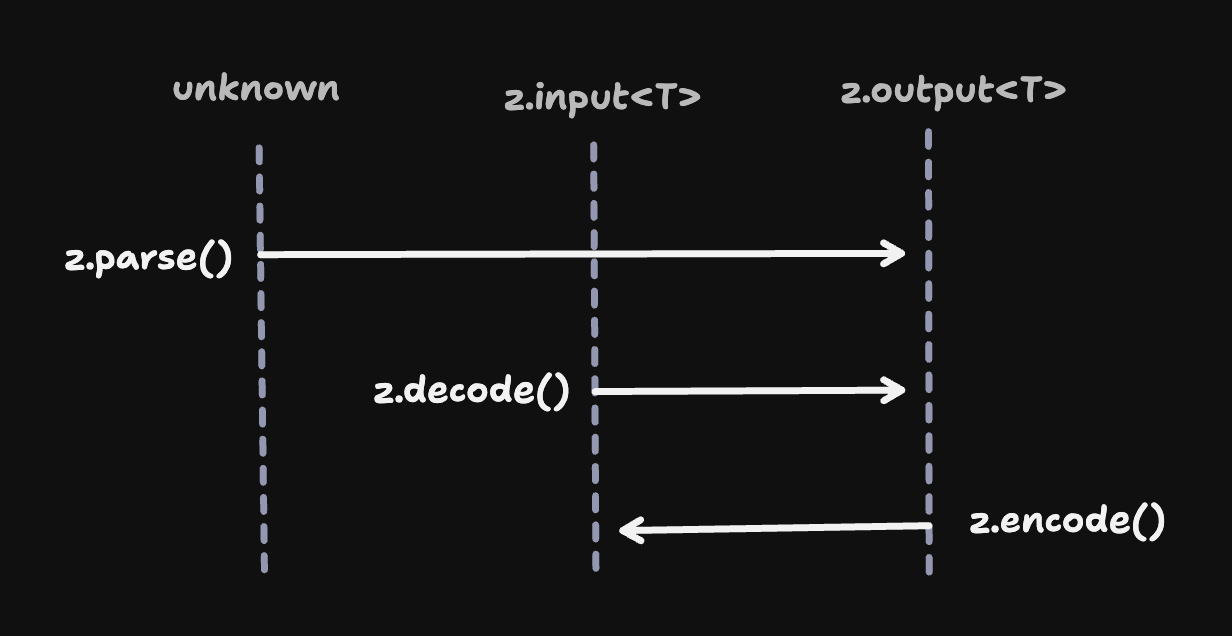
すべての Zod スキーマは、順方向と逆方向の両方で入力を処理できます:

  • 順方向 (Forward): Input から Output
    • .parse()
    • .decode()
  • 逆方向 (Backward): Output から Input
    • .encode()

ほとんどの場合、これは実質的な違いはありません。入力タイプと出力タイプが同一であるため、「順方向」と「逆方向」の間に違いはありません。

const schema = z.string();
 
type Input = z.input<typeof schema>;    // string
type Output = z.output<typeof schema>;  // string
 
schema.parse("asdf");   // => "asdf"
schema.decode("asdf");  // => "asdf"
schema.encode("asdf");  // => "asdf"

しかし、一部のスキーマタイプでは、入力タイプと出力タイプが分岐します。特に z.codec() がそうです。コーデックは、他の2つのスキーマ間の 双方向変換 を定義する特別なタイプのスキーマです。

const stringToDate = z.codec(
  z.iso.datetime(),  // input schema: ISO date string
  z.date(),          // output schema: Date object
  {
    decode: (isoString) => new Date(isoString), // ISO string → Date
    encode: (date) => date.toISOString(),       // Date → ISO string
  }
);

これらのケースでは、z.decode()z.encode() はかなり異なる動作をします。

stringToDate.decode("2024-01-15T10:30:00.000Z")
// => Date
 
stringToDate.encode(new Date("2024-01-15T10:30:00.000Z"))
// => string

注意 — ここでの方向や用語に特別な意味はありません。A -> B コーデックで エンコード する代わりに、B -> A コーデックで デコード することもできます。「デコード」と「エンコード」という用語の使用は単なる慣習です。

これは、ネットワーク境界でデータを解析する場合に特に便利です。クライアントとサーバー間で単一の Zod スキーマを共有し、この単一のスキーマを使用して、ネットワークに適した形式(例:JSON)と、より豊富な JavaScript 表現との間で変換できます。

Codecs encoding and decoding data across a network boundary

コンポーザビリティ (Composability)

注意z.encode()z.decode() はどのスキーマでも使用できます。ZodCodec である必要はありません。

コーデックは他のスキーマと同様にスキーマです。オブジェクト、配列、パイプなどの内部にネストできます。どこで使用できるかについてのルールはありません!

const payloadSchema = z.object({ 
  startDate: stringToDate 
});
 
payloadSchema.decode({
  startDate: "2024-01-15T10:30:00.000Z"
}); // => { startDate: Date }

型安全な入力 (Type-safe inputs)

.parse().decode()実行時 には同じように動作しますが、型シグネチャが異なります。.parse() メソッドは unknown を入力として受け入れ、スキーマの推論された 出力タイプ に一致する値を返します。対照的に、z.decode()z.encode() 関数は 強く型付けされた入力 を持ちます。

stringToDate.parse(12345); 
// no complaints from TypeScript (fails at runtime)
 
stringToDate.decode(12345); 
// ❌ TypeScript error: Argument of type 'number' is not assignable to parameter of type 'string'.
 
stringToDate.encode(12345); 
// ❌ TypeScript error: Argument of type 'number' is not assignable to parameter of type 'Date'.

なぜ違いがあるのでしょうか?エンコードとデコードは 変換 を意味します。多くの場合、これらのメソッドへの入力はアプリケーションコードですでに強く型付けされているため、z.decode/z.encode は、コンパイル時に間違いを表面化するために、強く型付けされた入力を受け入れます。 以下は、parse()decode()、および encode() の型シグネチャの違いを示す図です。
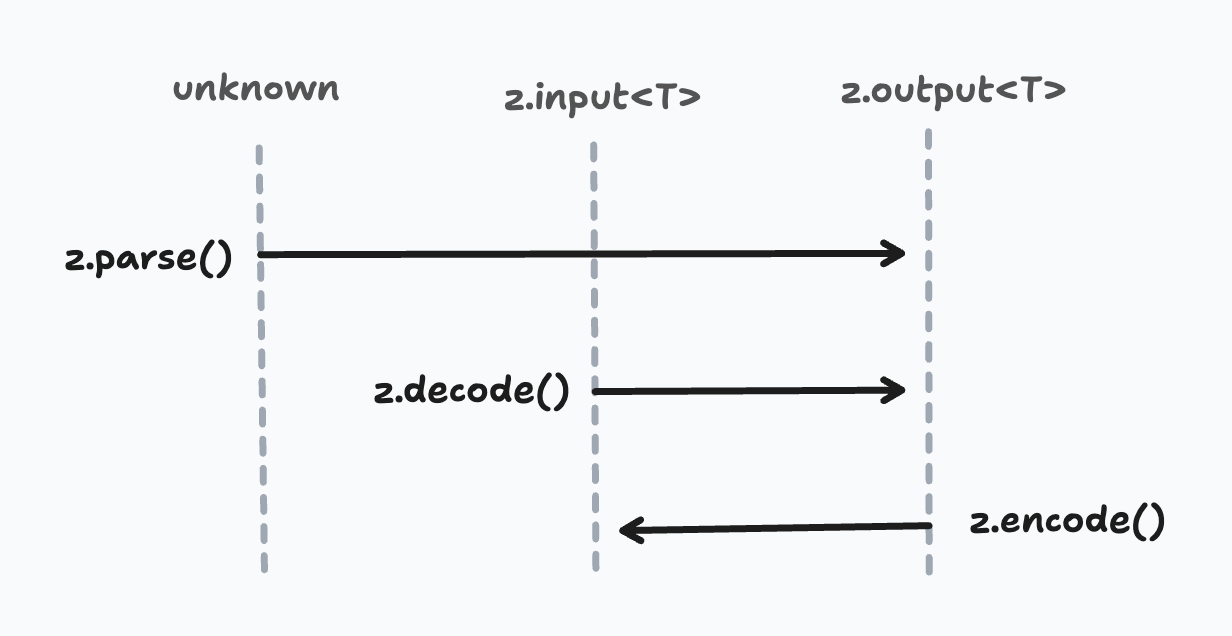
Codec directionality diagram showing bidirectional transformation between input and output schemas

非同期および安全なバリアント (Async and safe variants)

.transform().refine() と同様に、コーデックは非同期変換をサポートします。

const asyncCodec = z.codec(z.string(), z.number(), {
  decode: async (str) => Number(str),
  encode: async (num) => num.toString(),
});

通常の parse() と同様に、decode()encode() には「安全 (safe)」および「非同期 (async)」のバリアントがあります。

stringToDate.decode("2024-01-15T10:30:00.000Z"); 
// => Date
 
stringToDate.decodeAsync("2024-01-15T10:30:00.000Z"); 
// => Promise<Date>
 
stringToDate.safeDecode("2024-01-15T10:30:00.000Z"); 
// => { success: true, data: Date } | { success: false, error: ZodError }
 
stringToDate.safeDecodeAsync("2024-01-15T10:30:00.000Z"); 
// => Promise<{ success: true, data: Date } | { success: false, error: ZodError }>

エンコードの仕組み (How encoding works)

Zod スキーマによっては、解析動作を「反転」させる方法に微妙な点があります。

コーデック (Codecs)

これはかなり自明です。コーデックは、2つのタイプ間の双方向変換をカプセル化します。z.decode()decode 変換をトリガーして入力を解析された値に変換し、z.encode()encode 変換をトリガーしてシリアル化して戻します。

const stringToDate = z.codec(
  z.iso.datetime(),  // input schema: ISO date string
  z.date(),          // output schema: Date object
  {
    decode: (isoString) => new Date(isoString), // ISO string → Date
    encode: (date) => date.toISOString(),       // Date → ISO string
  }
);
 
stringToDate.decode("2024-01-15T10:30:00.000Z"); 
// => Date
 
stringToDate.encode(new Date("2024-01-15")); 
// => string

パイプ (Pipes)

豆知識 — コーデックは実際には、内部的には「中間」変換ロジックで強化されたパイプの サブクラス として実装されています。

通常のデコード中、ZodPipe<A, B> スキーマは最初に A でデータを解析し、次にそれを B に渡します。ご想像のとおり、エンコード中は、データは最初に B でエンコードされ、次に A に渡されます。

リファインメント (Refinements)

すべてのチェック(.refine().min().max() など)は、双方向で実行されます。

const schema = stringToDate.refine((date) => date.getFullYear() >= 2000, "Must be this millennium");
 
schema.encode(new Date("2000-01-01"));
// => Date
 
schema.encode(new Date("1999-01-01"));
// => ❌ ZodError: [
//   {
//     "code": "custom",
//     "path": [],
//     "message": "Must be this millennium"
//   }
// ]

カスタム .refine() ロジックでの予期しないエラーを回避するために、Zod は z.encode() 中に2つの「パス」を実行します。最初のパスでは、入力タイプが期待されるタイプに準拠していることを確認します(invalid_type エラーなし)。それが合格した場合、Zod はリファインメントロジックを実行する2番目のパスを実行します。

このアプローチは、z.string().trim()z.string().toLowerCase() のような「変異変換」もサポートします。

const schema = z.string().trim();
 
schema.decode("  hello  ");
// => "hello"
 
schema.encode("  hello  ");
// => "hello"

デフォルトとプリフォールト (Defaults and prefaults)

デフォルトとプリフォールトは、「順方向」にのみ適用されます。

const stringWithDefault = z.string().default("hello");
 
stringWithDefault.decode(undefined); 
// => "hello"
 
stringWithDefault.encode(undefined); 
// => ZodError: Expected string, received undefined

スキーマにデフォルト値をアタッチすると、入力はオプション (| undefined) になりますが、出力はそうなりません。したがって、undefinedz.encode() への有効な入力ではなく、デフォルト/プリフォールトは適用されません。

キャッチ (Catch)

同様に、.catch() は「順方向」にのみ適用されます。

const stringWithCatch = z.string().catch("hello");
 
stringWithCatch.decode(1234); 
// => "hello"
 
stringWithCatch.encode(1234); 
// => ZodError: Expected string, received number

Stringbool

注意Stringbool は、Zod にコーデックが導入される前から存在していました。それ以来、内部的にコーデックとして再実装されました。

z.stringbool() API は、文字列値 ("true", "false", "yes", "no" など) を boolean に変換します。デフォルトでは、z.encode() 中に true"true" に、false"false" に変換します。

const stringbool = z.stringbool();
 
stringbool.decode("true");  // => true
stringbool.decode("false"); // => false
 
stringbool.encode(true);    // => "true"
stringbool.encode(false);   // => "false"

カスタムの truthyfalsy 値のセットを指定した場合、配列の最初の要素 が代わりに使用されます。

const stringbool = z.stringbool({ truthy: ["yes", "y"], falsy: ["no", "n"] });
 
stringbool.encode(true);    // => "yes"
stringbool.encode(false);   // => "no"

変換 (Transforms)

⚠️ — .transform() API は、一方向 変換を実装します。スキーマ内のどこかに .transform() が存在する場合、z.encode() 操作を試行すると 実行時エラー がスローされます(ZodError ではありません)。

const schema = z.string().transform(val => val.length);
 
schema.encode(1234); 
// ❌ Error: Encountered unidirectional transform during encode: ZodTransform

便利なコーデック (Useful codecs)

以下は、一般的に必要とされる多くのコーデックの実装です。カスタマイズ性のために、これらは Zod 自体のファーストクラス API としては含まれていません。代わりに、それらをプロジェクトにコピー/貼り付けし、必要に応じて変更してください。

注意 — これらのコーデック実装はすべて、正確性がテストされています。

stringToNumber

parseFloat() を使用して、数値の文字列表現を JavaScript の number 型に変換します。

const stringToNumber = z.codec(z.string().regex(z.regexes.number), z.number(), {
  decode: (str) => Number.parseFloat(str),
  encode: (num) => num.toString(),
});
 
stringToNumber.decode("42.5");  // => 42.5
stringToNumber.encode(42.5);    // => "42.5"

stringToInt

parseInt() を使用して、整数の文字列表現を JavaScript の number 型に変換します。

const stringToInt = z.codec(z.string().regex(z.regexes.integer), z.int(), {
  decode: (str) => Number.parseInt(str, 10),
  encode: (num) => num.toString(),
});
 
stringToInt.decode("42");  // => 42
stringToInt.encode(42);    // => "42"

stringToBigInt

文字列表現を JavaScript の bigint 型に変換します。

const stringToBigInt = z.codec(z.string(), z.bigint(), {
  decode: (str) => BigInt(str),
  encode: (bigint) => bigint.toString(),
});
 
stringToBigInt.decode("12345");  // => 12345n
stringToBigInt.encode(12345n);   // => "12345"

numberToBigInt

JavaScript の numberbigint 型に変換します。

const numberToBigInt = z.codec(z.int(), z.bigint(), {
  decode: (num) => BigInt(num),
  encode: (bigint) => Number(bigint),
});
 
numberToBigInt.decode(42);   // => 42n
numberToBigInt.encode(42n);  // => 42

isoDatetimeToDate

ISO 日時文字列を JavaScript の Date オブジェクトに変換します。

const isoDatetimeToDate = z.codec(z.iso.datetime(), z.date(), {
  decode: (isoString) => new Date(isoString),
  encode: (date) => date.toISOString(),
});
 
isoDatetimeToDate.decode("2024-01-15T10:30:00.000Z");  // => Date object
isoDatetimeToDate.encode(new Date("2024-01-15"));       // => "2024-01-15T00:00:00.000Z"

epochSecondsToDate

Unix タイムスタンプ(エポックからの秒数)を JavaScript の Date オブジェクトに変換します。

const epochSecondsToDate = z.codec(z.int().min(0), z.date(), {
  decode: (seconds) => new Date(seconds * 1000),
  encode: (date) => Math.floor(date.getTime() / 1000),
});
 
epochSecondsToDate.decode(1705314600);  // => Date object
epochSecondsToDate.encode(new Date());  // => Unix timestamp in seconds

epochMillisToDate

Unix タイムスタンプ(エポックからのミリ秒数)を JavaScript の Date オブジェクトに変換します。

const epochMillisToDate = z.codec(z.int().min(0), z.date(), {
  decode: (millis) => new Date(millis),
  encode: (date) => date.getTime(),
});
 
epochMillisToDate.decode(1705314600000);  // => Date object
epochMillisToDate.encode(new Date());     // => Unix timestamp in milliseconds

json(schema)

JSON 文字列を構造化データに解析し、JSON にシリアル化して戻します。この汎用関数は、解析された JSON データを検証するための出力スキーマを受け入れます。

const jsonCodec = <T extends z.core.$ZodType>(schema: T) =>
  z.codec(z.string(), schema, {
    decode: (jsonString, ctx) => {
      try {
        return JSON.parse(jsonString);
      } catch (err: any) {
        ctx.issues.push({
          code: "invalid_format",
          format: "json",
          input: jsonString,
          message: err.message,
        });
        return z.NEVER;
      }
    },
    encode: (value) => JSON.stringify(value),
  });

特定のスキーマを使用した使用例:

const jsonToObject = jsonCodec(z.object({ name: z.string(), age: z.number() }));
 
jsonToObject.decode('{"name":"Alice","age":30}');  
// => { name: "Alice", age: 30 }
 
jsonToObject.encode({ name: "Bob", age: 25 });     
// => '{"name":"Bob","age":25}'
 
jsonToObject.decode('~~invalid~~'); 
// ZodError: [
//   {
//     "code": "invalid_format",
//     "format": "json",
//     "path": [],
//     "message": "Unexpected token '~', \"~~invalid~~\" is not valid JSON"
//   }
// ]

utf8ToBytes

UTF-8 文字列を Uint8Array バイト配列に変換します。

const utf8ToBytes = z.codec(z.string(), z.instanceof(Uint8Array), {
  decode: (str) => new TextEncoder().encode(str),
  encode: (bytes) => new TextDecoder().decode(bytes),
});
 
utf8ToBytes.decode("Hello, 世界!");  // => Uint8Array
utf8ToBytes.encode(bytes);          // => "Hello, 世界!"

bytesToUtf8

Uint8Array バイト配列を UTF-8 文字列に変換します。

const bytesToUtf8 = z.codec(z.instanceof(Uint8Array), z.string(), {
  decode: (bytes) => new TextDecoder().decode(bytes),
  encode: (str) => new TextEncoder().encode(str),
});
 
bytesToUtf8.decode(bytes);          // => "Hello, 世界!"
bytesToUtf8.encode("Hello, 世界!");  // => Uint8Array

base64ToBytes

base64 文字列を Uint8Array バイト配列に変換します(その逆も同様)。

const base64ToBytes = z.codec(z.base64(), z.instanceof(Uint8Array), {
  decode: (base64String) => z.util.base64ToUint8Array(base64String),
  encode: (bytes) => z.util.uint8ArrayToBase64(bytes),
});
 
base64ToBytes.decode("SGVsbG8=");  // => Uint8Array([72, 101, 108, 108, 111])
base64ToBytes.encode(bytes);       // => "SGVsbG8="

base64urlToBytes

base64url 文字列 (URL セーフな base64) を Uint8Array バイト配列に変換します。

const base64urlToBytes = z.codec(z.base64url(), z.instanceof(Uint8Array), {
  decode: (base64urlString) => z.util.base64urlToUint8Array(base64urlString),
  encode: (bytes) => z.util.uint8ArrayToBase64url(bytes),
});
 
base64urlToBytes.decode("SGVsbG8");  // => Uint8Array([72, 101, 108, 108, 111])
base64urlToBytes.encode(bytes);      // => "SGVsbG8"

hexToBytes

16進文字列を Uint8Array バイト配列に変換します(その逆も同様)。

const hexToBytes = z.codec(z.hex(), z.instanceof(Uint8Array), {
  decode: (hexString) => z.util.hexToUint8Array(hexString),
  encode: (bytes) => z.util.uint8ArrayToHex(bytes),
});
 
hexToBytes.decode("48656c6c6f");     // => Uint8Array([72, 101, 108, 108, 111])
hexToBytes.encode(bytes);            // => "48656c6c6f"

stringToURL

URL 文字列を JavaScript の URL オブジェクトに変換します。

const stringToURL = z.codec(z.url(), z.instanceof(URL), {
  decode: (urlString) => new URL(urlString),
  encode: (url) => url.href,
});
 
stringToURL.decode("https://example.com/path");  // => URL object
stringToURL.encode(new URL("https://example.com"));  // => "https://example.com/"

stringToHttpURL

HTTP/HTTPS URL 文字列を JavaScript の URL オブジェクトに変換します。

const stringToHttpURL = z.codec(z.httpUrl(), z.instanceof(URL), {
  decode: (urlString) => new URL(urlString),
  encode: (url) => url.href,
});
 
stringToHttpURL.decode("https://api.example.com/v1");  // => URL object
stringToHttpURL.encode(url);                           // => "https://api.example.com/v1"

uriComponent

encodeURIComponent()decodeURIComponent() を使用して URI コンポーネントをエンコードおよびデコードします。

const uriComponent = z.codec(z.string(), z.string(), {
  decode: (encodedString) => decodeURIComponent(encodedString),
  encode: (decodedString) => encodeURIComponent(decodedString),
});
 
uriComponent.decode("Hello%20World%21");  // => "Hello World!"
uriComponent.encode("Hello World!");      // => "Hello%20World!"